
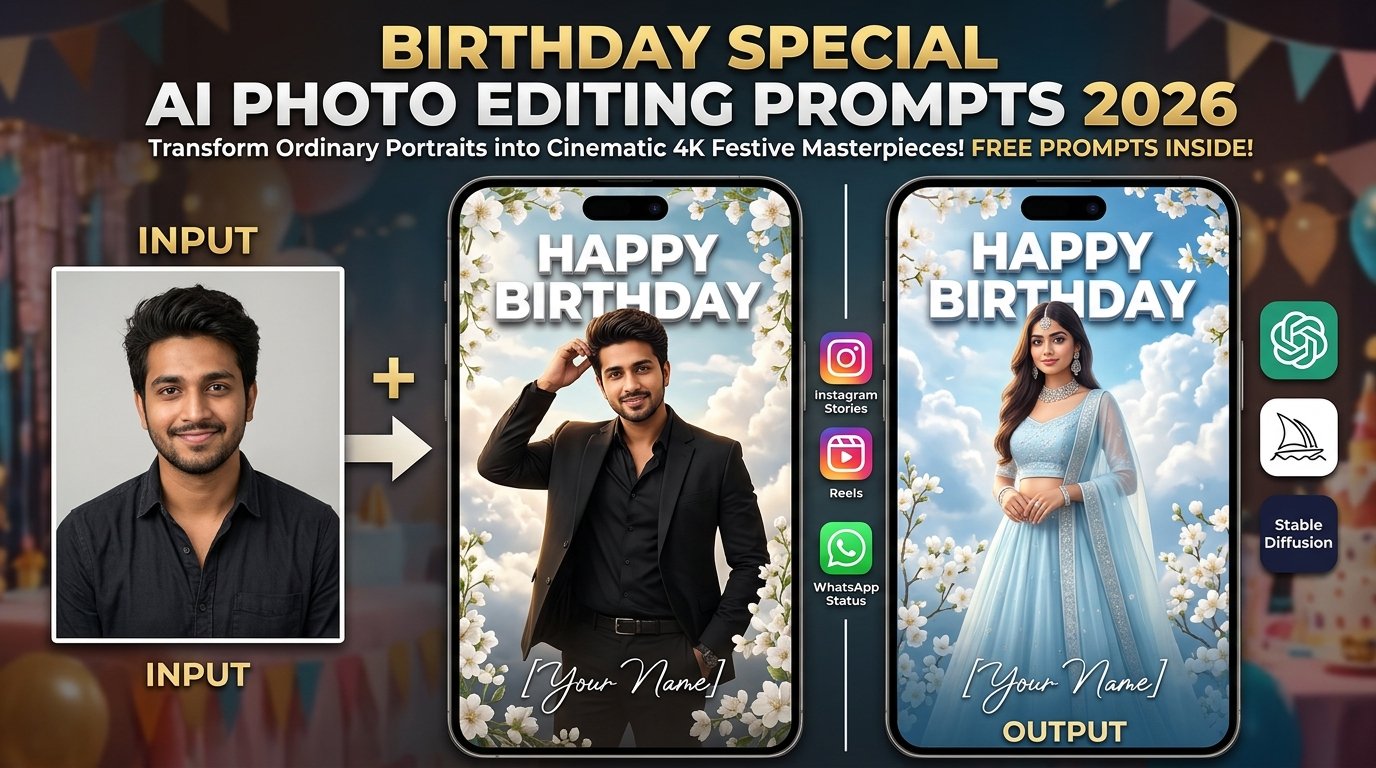
Birthday celebrations are among the most memorable milestones of the year, and sharing personalized festive portraits on social media has become a staple for Instagram, Facebook, and WhatsApp. Moving past standard photo filters and tedious manual editing in Photoshop, advanced AI image generation tools allow you to transform a simple portrait into a professionally designed, cinematic birthday masterpiece complete with luxury decorations, custom number collages, and dreamlike lighting.
This comprehensive guide covers everything you need to craft your own viral birthday posters, featuring multi-style prompt blocks, step-by-step tool workflows, and expert optimization tips.
What Is Birthday AI Photo Editing?
Birthday AI Photo Editing is a creative method that uses generative artificial intelligence to transform regular photographs into professional birthday posters and portraits based on detailed text prompts and character reference images. Instead of manually compiling background decorations, balloons, custom typography, and multi-photo frames, you can describe your exact vision—whether it’s a luxury number collage or a dreamy floral setup—and let the AI construct the final composition.
Interactive AI Prompt Workspaces
Choose from three master-crafted prompt options below. Click the respective “Copy Prompt” button to grab your preferred style instantly.
Option 1: 3D Number Collage Birthday Poster Prompt (Boy / Girl Customizable)
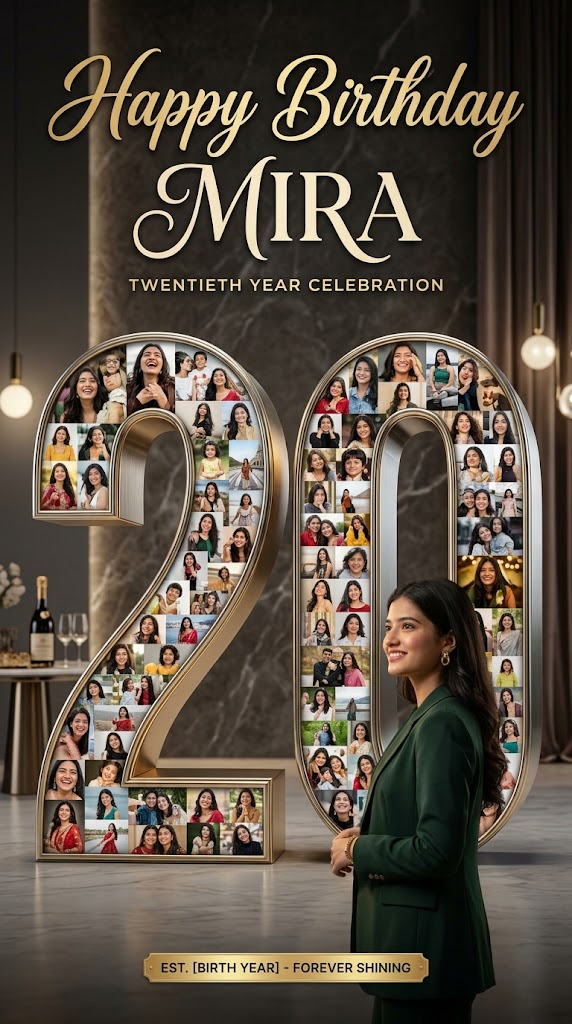
Create an ultra-realistic, premium birthday collage poster in 9:16 vertical aspect ratio (8K resolution), using the uploaded reference photo as the exact identity. The poster features a large 3D metallic number “20” in the center, intricately filled with a photo collage of smaller portrait shots of the same person. At the top, artistic cursive typography reads “Happy Birthday” followed by a customizable name script. The main subject stands in the foreground facing the number collage. Cinematic studio lighting, realistic reflections, photorealistic textures, high-end professional magazine layout.
Option 2: Dreamy Floral Sky Birthday Poster Prompt (Female)
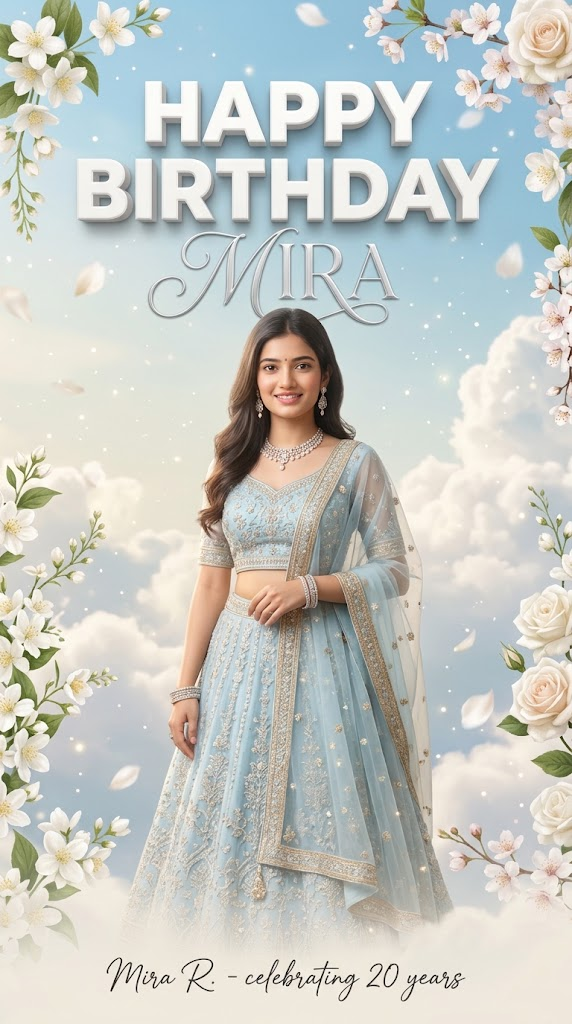
Create an ultra-realistic dreamy birthday poster featuring the young Indian woman from the uploaded reference photo standing in the center, preserving her exact facial features, skin tone, and hair styling. She is wearing a light pastel blue designer lehenga with matching sheer dupatta and elegant jewelry. The background is an ethereal sky filled with soft white clouds, gentle blue tones, and blooming white spring flowers framing the edges. Large 3D white bold typography at the top reads “HAPPY BIRTHDAY”, and a clean signature text script at the bottom displays a custom name. Soft cinematic lighting, pastel color grading, 8k resolution, vertical 9:16 layout.
Option 3: Premium Suit Birthday Poster Prompt (Male)
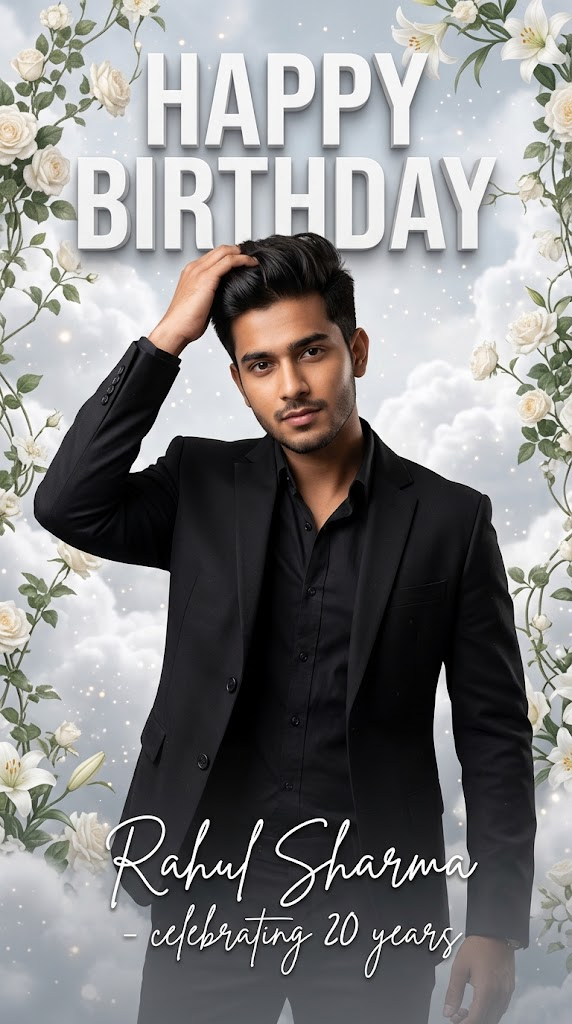
Create an ultra-realistic premium birthday poster featuring the exact young Indian man from the uploaded reference photo. Preserve his facial features, hairstyle, and expression precisely. He is dressed in a sharp black blazer over a black shirt, adjusting his hair stylishly. The background features a dreamy sky filled with white clouds and blooming white floral vines framing the composition. Bold 3D white typography at the top reads “HAPPY BIRTHDAY”, and a clean handwritten signature script at the bottom displays a custom name. Cinematic studio lighting, sparkling atmosphere, 8k resolution, vertical 9:16 aspect ratio.
Step-by-Step Tutorial: How to Create Your Birthday AI Photos
Step 1: Prepare Your Reference Photo
- Choose a clear, high-resolution photo where your face is properly illuminated and unobstructed. Avoid blurry or heavily filtered images to ensure the AI maintains your exact likeness.
Step 2: Access an AI Image Generator
- Open your preferred AI image creation platform (such as ChatGPT, Bing Image Creator, or Midjourney) that supports image uploads and prompt execution.
Step 3: Upload and Paste the Prompt
- Upload your reference photo into the tool.
- Copy your preferred birthday prompt from the interactive widgets above, paste it into the prompt box, and customize the name/age text to fit your personal celebration.
Step 4: Generate and Review
- Submit your request and wait for the image to render. Inspect the fine details—such as facial features, typography spelling, and background decorations. If any element looks unnatural, tweak your text instructions and regenerate.
Pro Tips for Better Birthday AI Photos
- Customizing Text & Names: When pasting prompts into generators like ChatGPT, you can explicitly state your desired name (e.g., “Change the name script at the bottom to read [Your Name]”) to personalize the poster.
- Optimizing for Social Media: Always verify that your final output is locked to a 9:16 vertical ratio, making it instantly compatible with Instagram Stories, Reels, and WhatsApp status updates.
- Multi-Photo Reels: Combine several AI-generated birthday posters with smooth transitions and upbeat background music in CapCut or VN Editor to create a stunning birthday video montage.
Frequently Asked Questions (FAQs)
Q1: Do I need advanced design experience to create these birthday posters?
Answer: Not at all. The AI interprets natural language prompts and your reference photo, handling complex layout rendering, lighting, and typography automatically.
Q2: What should I do if the AI misspells my name on the poster?
Answer: Text rendering in AI can occasionally introduce typos. If the name or “Happy Birthday” text is misspelled, simply reply to the generator with a quick correction instruction (e.g., “Fix the spelling of the name script to be exact”) to clean it up.
Q3: Can I change the clothing or background theme?
Answer: Yes! You can easily modify descriptive keywords in the prompt text—such as changing a pastel blue lengha to a royal red gown, or swapping floral backgrounds for a dark luxury party setup.