
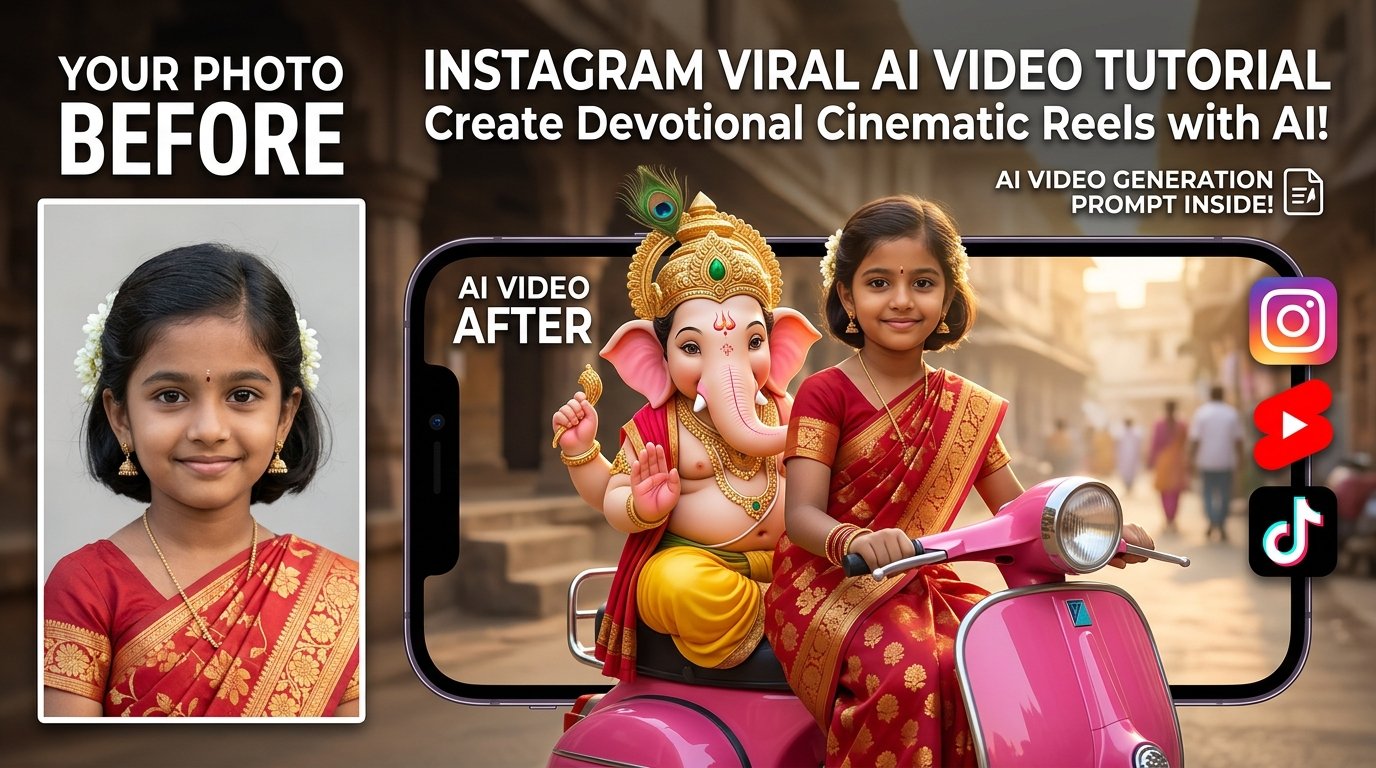
AI video generation has rapidly evolved into one of the most powerful ways to create unique, high-engagement content for Instagram Reels, YouTube Shorts, and TikTok. With the right master prompt and a clear character reference photo, you can produce cinematic scenes that would be practically impossible—or prohibitively expensive—to capture in real life.
One of the most viral trends dominating social media features a captivating devotional concept: a girl riding a glossy vintage scooter with Lord Ganesha seated beside her, blending rich cultural heritage with modern artificial intelligence.
This comprehensive guide covers everything you need to craft your own viral version, complete with pro prompt engineering, tool workflows, and insider tips to fix common AI video glitches.
🎨 Featured Visual Assets & AI Image Generation Prompts
Use the following prompt in Midjourney, DALL-E 3, or Stable Diffusion to generate your eye-catching image:
What Is This Instagram Viral AI Video Trend?
The mechanism behind this viral concept is straightforward yet powerful. Instead of merely animating or “morphing” an original static photograph, advanced Image-to-Video models analyze the subject’s facial identity and construct an entirely new, dynamic cinematic scene around them.
- The Subject: A girl sitting upright at the front of a bright-pink vintage scooter, dressed in traditional red-and-gold ethnic attire.
- The Companion: Lord Ganesha riding immediately behind her on screen-left, bringing a peaceful, emotional, and devotional element to the video.
- The Camera Work: A continuous frontal tracking shot where the camera moves backward smoothly while the scooter travels forward, producing a professional cinematic immersion.
- The Format: Optimized strictly for a 10-second, vertical 9:16 aspect ratio ideal for mobile-first algorithms.
Interactive AI Prompt Workspace
Use the tool below to instantly grab the master-crafted, ultra-detailed Instagram viral AI video prompt. Click the “Copy Prompt” button to copy it straight to your clipboard.
Create a 10-second vertical 9:16 photorealistic devotional video at 24 fps, with cinematic detail, warm natural lighting and one continuous frontal tracking shot. Use the uploaded photograph of the girl only as the identity and facial-expression reference. Do not simply display the original photograph. Build the complete scene from the text instructions. Only one human girl should appear in the scene. Face and Expression: Preserve the girl’s recognizable facial identity throughout the entire video. Maintain her facial proportions, skin tone, eyes, nose, lips, cheeks, jawline, hairline and overall natural appearance. Keep the facial expression consistent with the reference photograph. Do not change the smile intensity, mouth position, visible teeth, eyebrow position or emotional expression. Avoid talking, lip-syncing, exaggerated smiling, laughing, surprised expressions, eyebrow movements, beauty filters or artificial face reshaping. Keep her head orientation close to the reference image. Maintain a stable face across all frames. Create natural movement through the environment, scooter motion, clothing movement and subtle body movement rather than changing her face. Scene and Styling: The girl sits at the front of a glossy bright-pink vintage Indian scooter. She sits upright and naturally holds both black handlebar grips. Dress her in a modest child-sized red silk saree with rich gold floral patterns, a broad golden border and a matching short-sleeved blouse. Add small gold jhumkas, a delicate gold necklace, red-and-gold bangles and a tiny red bindi. Keep her dark hair naturally arranged, with small white flowers placed on one side. Keep the face clearly visible and preserve the recognizable hairline. Lord Ganesha rides immediately behind her and remains visible beside her head on screen-left. Give Ganesha a distinct elephant face, soft pink ears, a curled trunk, small tusks and an ornate golden crown decorated with a green jewel and peacock feather. Dress Ganesha in a yellow dhoti with a red-and-gold shawl and traditional gold ornaments. Keep the scene respectful, peaceful and devotional. Use realistic Indian visual details, natural fabric textures, realistic skin texture and cinematic lighting. The scooter moves gently forward while the camera tracks backward smoothly from the front. Maintain a single continuous shot with no cuts, transitions or camera jumps. Use warm natural light, realistic shadows, subtle environmental movement and detailed cinematic depth. Keep both the girl and Ganesha visually stable throughout the entire 10-second video. Make the final result photorealistic, peaceful, devotional and suitable for a vertical Instagram Reel.
Step-by-Step Tutorial: How to Generate Your Video
Step 1: Select and Prep Your Reference Photo
- Choose a clear, high-resolution front-facing or slightly angled portrait.
- Avoid photos where the face is obscured by heavy shadows, sunglasses, masks, or loose hair covering facial features. A clean portrait ensures the AI locks onto the correct identity features.
Step 2: Upload into a Supported AI Video Suite
- Open your preferred generative video platform (such as Runway, Flow AI, or multimodal engines) that accepts image references.
- Upload your portrait as the character identity reference asset.
Step 3: Deploy the Master Prompt
- Copy the prompt from the interactive code box above and paste it into the prompt input area.
- Lock your output settings to a 9:16 vertical aspect ratio, 24 fps, and a 10-second duration.
Step 4: Render and Refine
- Generate your video and review it for consistency. If the facial structure fluctuates or minor artifacts appear, re-run the generation or tweak your consistency weight settings.
Pro Tips to Prevent Common AI Video Glitches
- Preventing Face Morphing: Avoid adding erratic expression commands like “laughing,” “talking,” or “winking” in your text modifications, as these trigger facial distortion. Let the motion come from the scooter and background environment instead.
- Controlling Extra People: If the AI accidentally generates background pedestrians, ensure your negative prompts or generation settings restrict additional human figures.
- Maintaining Object Stability: Explicitly defining the scooter color (glossy bright-pink) prevents the AI from shifting vehicle colors mid-frame.
Frequently Asked Questions (FAQs)
Q1: Why does the AI sometimes change the person’s face during the video?
Answer: Character consistency is a common hurdle in temporal video models. To combat this, our prompt locks down facial proportions, expression intensity, and hairline structures while shifting movement to the background.
Q2: What tools support this kind of image-to-video workflow?
Answer: Platforms equipped with robust image-reference pipelines—such as Flow AI, Runway Gen-3, and advanced multimodal platforms—handle these detailed prompt specifications efficiently.
Q3: Is a 9:16 aspect ratio strictly necessary?
Answer: Yes. For vertical placement on Instagram Reels, YouTube Shorts, and TikTok, 9:16 ensures the full vertical frame composition (including the girl and Lord Ganesha) displays correctly without cropping.